2026 | March 6
 Updated
by
kevin cardoen
Updated
by
kevin cardoen
RELEASE NOTE, published on 2026, March 6
Renewed clustermodel in production: 2026, March 13
La version française se trouve au milieu - English version below
(NL versie)
- Impact van vernieuwd SD Worx Clustermodel in Insights Cloud
Wat betekent het vernieuwde Clustermodel voor jouw organisatie?
1) Inhoudelijke optimalisaties in Insights Cloud (Snowflake)
- Nieuwe kolommen: GPS'en: dynamischer rapporteren door te filteren op GPS velden
- Rapporten rond afwezigheden, ziekteverzuim en payroll measures blijven volledig intact. Payroll metrics zijn gealigneerd met nieuwe clustermodel zonder impact op jullie cijfers.
- Inzichten rond transportvergoedingen, premies en commissies kunnen wijzigen door de nieuwe indeling, omwille van wijzigingen van bepaalde clusters. Dit is gedocumenteerd in dit excel bestand: Renewed Clustermodel - March 2026.xlsx Payroll metrics die hierop gebaseerd zijn, zijn gealigneerd met nieuwe clustermodel zonder impact op jullie cijfers.
- Herindeling van looncodes en clusters zorgt voor een consistentere groepering van data en een betere aansluiting op toekomstige rapporteringsnoden.
- Het vernieuwde clustermodel is voorbereid op de EU Pay Transparency Richtlijn. De nieuwe structuur ondersteunt analyses zoals gender pay gap‑rapportering, vergelijking van gelijkaardige functies en transparantere loonopbouw. Er zijn bepaalde clusters verschoven/ verplaatst van niveau. Zie tabblad 'wijzigingen clusters' in excel.
- Er zijn ook aanpassingen gedaan in het kader van wijzigende wetgeving.
2) Verhoging van het gebruiksgemak in Insights Cloud (Snowflake)
- Het concept van GPS-en, die dynamischer rapporteren door te filteren op GPS velden mogelijk maakt, ondersteunt jullie om nog vlotter data om te zetten in zinvolle inzichten.
- De kolomnamen zelf zijn niet gewijzigd tav productie, dus deze blijven herkenbaar.
- Alle benamingen van de looncodes en clusters worden met dit vernieuwde clustermodel uniform aangeboden in drie talen (NL, FR, EN). Ook de GPS-en zijn beschikbaar in 3 talen bvb Wagecode_Cat_NL, nu ook in FR en EN. Wagecode_insight_sub_cat velden (5 niveaus) ook in 3 talen, daar waar het tot op heden alleen in NL voorzien was.
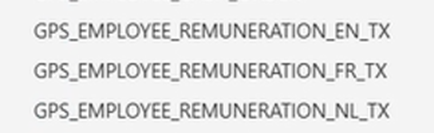
- Concatenatie van looncodes en omschrijving is ook ingevoegd, zodat het in 1 veld staat = wagecode_cd + wagecode_nl_tx (ook voor FR en EN) = Wagecode_full (naar analogie met ‘full’ name).
- Als de omschrijving van de looncode afwijkt van de standaard, maw als er een klant-specifieke omschrijving bestaat, wordt dit aangegeven met *.
- De wijzigingen en verschuivingen worden weergegeven in het overzicht in excel.
- Toelichting van de GPS'en
Hoe kan het clustermodel je nog sneller naar inzichten leiden?
Om data nog vlotter te transformeren naar zinvolle inzichten, voegen we het concept van een ‘GPS’ toe. Net zoals in een wagen waar de GPS je helpt om sneller je bestemming te bereiken, begeleiden deze nieuwe GPS'en je bij het opbouwen van rapporten en dashboards in de Insights Cloud. Wanneer je een rapport over een bepaald HR/payroll topic wil opbouwen, toont de GPS automatisch welke clusters, looncodes en variabelen relevant zijn, zodat je sneller tot een volledig en correct overzicht komt.
Via deze link op het tabblad 'GPS'en' vind je een overzicht van de verschillende GPS’en met toelichting.
- Stappenplan voor jou als Insights Cloud gebruiker
Welke acties onderneem je best?
- Ga na of je rapporten hebt met transportvergoedingen, premies en/of commissies. Die DAX formules gaan herschreven moeten worden.
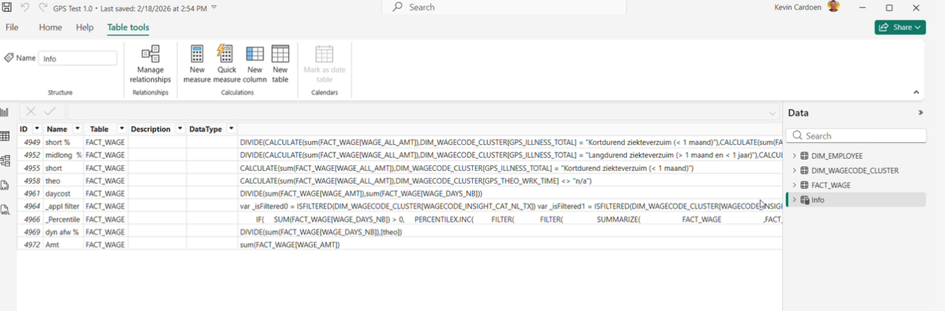
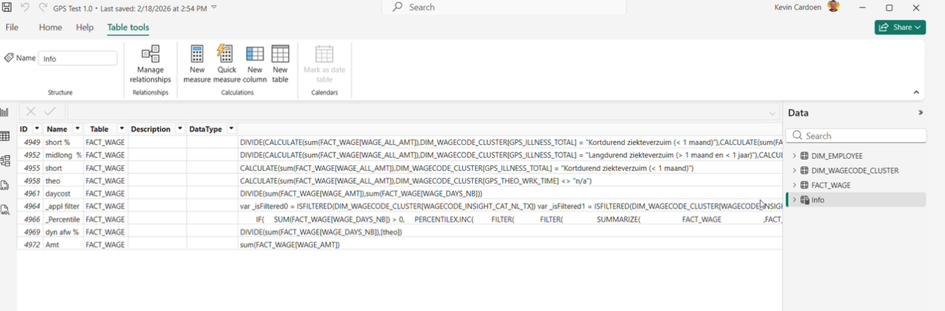
- Tip: In Power BI kan je een overzicht opvragen van al jouw measures (DAX formules) via een lijst in info.view.measures() via keuze ‘Table tools’ > ‘New table’ > Info = info.view.measures()
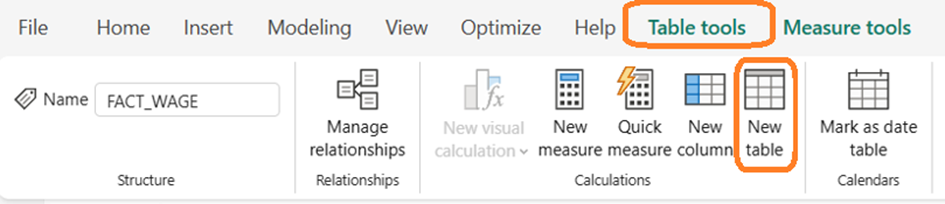
Info = INFO.VIEW.MEASURES()

Overzicht van de measures in Power BI
- Refresh jullie rapporten na de implementatie van het vernieuwde clustermodel.
---------------------------------------------------------------------------
(version FR)
- L’impact du modèle rénouvelé ‘SD Worx Clustermodel’ dans Insights Cloud
Que signifie le nouveau ‘clustermodel’ pour votre organisation ?
1) Optimisations du contenu dans Insights Cloud (Snowflake)
- Nouvelles colonnes : GPS : rapports plus dynamiques grâce au filtrage des champs GPS.
- Les rapports sur les absences, les absences pour cause de maladie et les mesures salariales restent inchangés. Les indicateurs salariaux sont alignés sur le nouveau ‘clustermodel’ sans impact sur vos chiffres.
- Les informations relatives aux indemnités de transport, aux primes et aux commissions peuvent changer en raison de la nouvelle classification, en raison de modifications apportées à certains clusters. Cela est documenté dans ce fichier Excel : Renewed clustermodel - march 2026.xlsx Les mesures salariales qui en découlent sont alignées sur le nouveau modèle de cluster sans impact sur vos chiffres.
- La réorganisation des codes salariaux et des clusters permet un regroupement plus cohérent des données et une meilleure adéquation avec les besoins futurs en matière de reporting.
- Le nouveau ‘clustermodel’ est conforme à la directive européenne sur la transparence salariale. La nouvelle structure facilite les analyses telles que les rapports sur l'écart salarial entre les hommes et les femmes, la comparaison de fonctions similaires et une structure salariale plus transparente. Certains clusters ont été déplacés d'un niveau à l'autre. Voir l'onglet « Changes clusters » dans Excel.
- Des modifications ont également été apportées dans le cadre de l'évolution de la législation.
2) Amélioration de la facilité d'utilisation dans Insights Cloud (Snowflake)
- Le concept de GPS, qui permet un reporting plus dynamique grâce au filtrage des champs GPS, vous aide à convertir encore plus facilement les données en informations utiles.
- Les noms des colonnes n'ont pas changé par rapport à la version précédente, ils restent donc reconnaissables.
- Toutes les désignations des codes salariaux et des clusters sont présentées de manière uniforme en trois langues (NL, FR, EN) dans ce nouveau modèle de cluster. Les GPS sont également disponibles en 3 langues, par exemple Wagecode_Cat_NL, désormais également en FR et EN. Les champs Wagecode_insight_sub_cat (5 niveaux) sont également disponibles en 3 langues, alors qu'ils n'étaient jusqu'à présent disponibles qu'en NL.
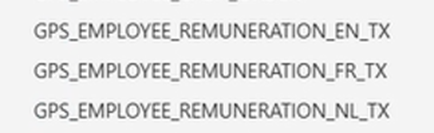
- La concaténation des codes salariaux et de la description a également été ajoutée, de sorte qu'elle figure dans un seul champ = wagecode_cd + wagecode_nl_tx (également pour FR et EN) = Wagecode_full (par analogie avec « full » name).
- Si la description du code salarial s'écarte de la norme, c'est-à-dire s'il existe une description spécifique au client, cela est indiqué par *.
- Les modifications et les changements sont indiqués dans l'aperçu Excel.
- Explication des GPS
Comment le 'clustermodel' peut-il vous aider à obtenir des informations encore plus rapidement ?
Afin de transformer encore plus facilement les données en informations utiles, nous ajoutons le concept de « GPS ». Tout comme dans une voiture où le GPS vous aide à atteindre votre destination plus rapidement, ces nouveaux GPS vous guident dans la création de rapports et de tableaux de bord dans Insights Cloud. Lorsque vous souhaitez créer un rapport sur un sujet RH/paie spécifique, le GPS vous indique automatiquement les clusters, codes salariaux et variables pertinents, afin que vous puissiez obtenir plus rapidement un aperçu complet et correct.
Via ce lien dans l'onglet « GPS », vous trouverez un aperçu des différents GPS avec des explications.
- Plan par étapes pour vous comme utiliseur d'Insights Cloud
Quelles sont les meilleures mesures à prendre ?
- Vérifiez si vous avez des rapports contenant des indemnités de transport, des primes et/ou des commissions. Ces formules DAX devront être réécrites.
- Conseil : dans Power BI, vous pouvez demander un aperçu de toutes vos mesures (formules DAX) via une liste dans info.view.measures() en sélectionnant « Table tools » > « New table » > Info = info.view.measures().
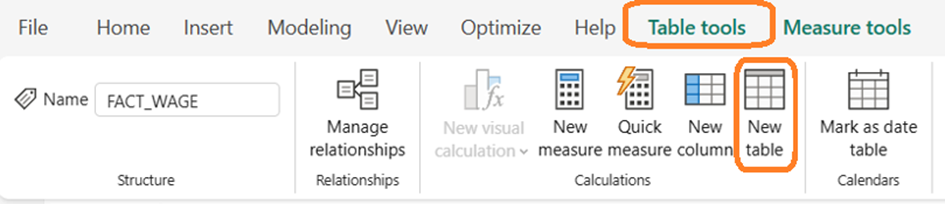
Info = INFO.VIEW.MEASURES()

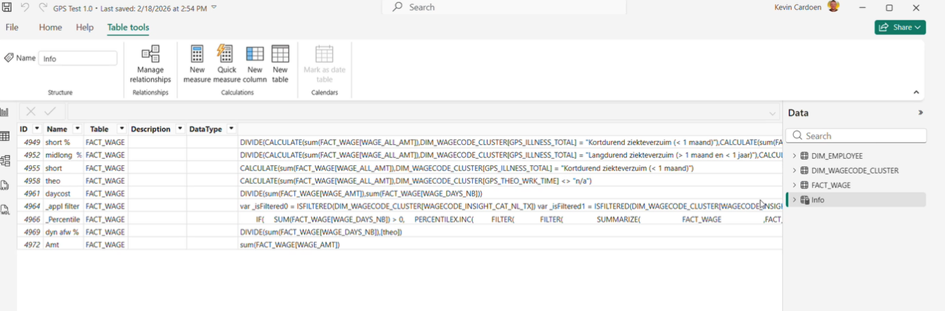
Une vue sur les mesaures dans Power BI
- Actualisez vos rapports après la mise en œuvre du nouveau 'clustermodel'.
---------------------------------------------------------------------------
- Impact of the renewed SD Worx Clustermodel in Insights Cloud
What does the renewed Clustermodel mean for your organisation?
1) Content optimisations in Insights Cloud (Snowflake)
- New columns: GPS: more dynamic reporting by filtering on GPS fields.
- Reports on absences, sick leave and payroll measures remain completely intact. Payroll metrics are aligned with the new clustermodel without impacting your figures.
- Insights into transport allowances, premiums and commissions may change due to the new classification, as a result of changes to certain clusters. This is documented in this Excel file: Renewed Clustermodel - March 2026.xlsx Payroll metrics based on this are aligned with the new clustermodel without impacting your figures.
- The reclassification of pay codes and clusters ensures more consistent data grouping and better alignment with future reporting needs.
- The renewed clustermodel is prepared for the EU Pay Transparency Directive. The new structure supports analyses such as gender pay gap reporting, comparison of similar jobs and more transparent wage structure. Certain clusters have been shifted/moved from one level to another. See the “cluster changes” tab in Excel.
- Adjustments have also been made in the context of changing legislation.
2) Increased ease of use in Insights Cloud (Snowflake)
- The concept of GPS, which enables more dynamic reporting by filtering on GPS fields, helps you convert data into meaningful insights even more smoothly.
- The column names themselves have not changed in production, so they remain recognisable.
- All names of wage codes and clusters are presented uniformly in three languages (NL, FR, EN) with this updated cluster model. The GPS codes are also available in three languages, e.g. Wagecode_Cat_NL, now also in FR and EN. Wagecode_insight_sub_cat fields (five levels) are also available in three languages, whereas previously they were only available in Dutch.
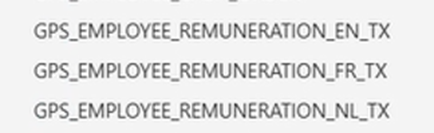
- Concatenation of wage codes and descriptions has also been added, so that it appears in one field = wage code_cd + wage code_nl_tx (also for FR and EN) = Wage code_full (analogous to “full” name).
- If the description of the wage code deviates from the standard, i.e. if there is a customer-specific description, this is indicated with *.
- The changes and shifts are shown in the overview in Excel.
- Explanation of the GPSs
How can the clustermodel lead you to insights even faster?
To transform data into meaningful insights even more smoothly, we are adding the concept of a “GPS”. Just as in a car, where the GPS helps you reach your destination faster, these new GPSs guide you in building reports and dashboards in the Insights Cloud. When you want to build a report on a specific HR/payroll topic, the GPS automatically shows which clusters, wage codes and variables are relevant, so you can get a complete and accurate overview more quickly.
Via this link on the “GPS's” tab, you will find an overview of the different GPSs with explanations.
- Step-by-step plan for you as an Insights Cloud user
What actions could/shoud you take?
- Check whether you have reports with transport allowances, premiums and/or commissions. Those DAX formulas will need to be rewritten.
- Tip: In Power BI, you can request an overview of all your measures (DAX formulas) via a list in info.view.measures() by selecting “Table tools” > “New table” > Info = info.view.measures().
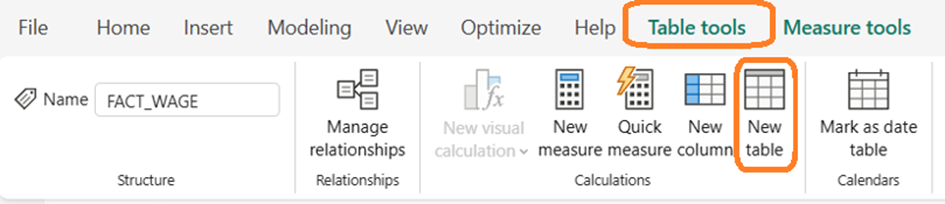
Info = INFO.VIEW.MEASURES()

Overview of the measures in Power BI
- Refresh your reports after implementing the updated clustermodel.
